

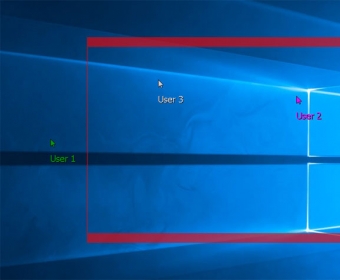
Enable multiple users to work within a single desktop. Display several different cursors indicating remote machines or access ports. Control the connections and automatically distribute processing power. Define restrictions for screen access by individual users.
TeamPlayer makes co-working, co-learning, co-reviewing, and co-operating easy. Useful for any task that requires the participation of multiple users in one single PC, this app allows up to six users to be connected to the same computer either via any of its USB ports (through a mouse or keyboard) or remotely, via the Internet, a LAN, or a Wi-Fi connection. If you happen to grant access to more than six users at a time, Dicolab offers you various licensing schemes to overcome this limitation.
Remote users are required to install a free app (TeamCONNECT) that will allow them to connect to the group. Except for this and the few extra configuration steps required to allow remote connections to use the program, setting up and enjoying the multi-user capabilities of TeamPlayer couldn’t be simpler and more straightforward. Local users just need to connect their mouse or keyboard to one of the free USB ports available (or to a multi-port USB hub) to become part of the group. This new version 4 of the program allows the main user to restrict the area through which the various users can move around, thus preventing them from accessing sensitive system icons and apps or restricted documentation. more






Comments (1)